

Free Professional-Cloud-DevOps-Engineer pdf Files With Updated and Accurate Dumps Training
Top-Class Professional-Cloud-DevOps-Engineer Question Answers Study Guide
Google Professional-Cloud-DevOps-Engineer certification exam consists of multiple-choice and multiple-select questions, and it is delivered online through a secure testing platform. Professional-Cloud-DevOps-Engineer exam is designed to test the candidate's ability to solve real-world problems using Google Cloud Platform (GCP) technologies and services.
Google Professional-Cloud-DevOps-Engineer certification exam is a computer-based test that consists of multiple-choice questions and takes around two hours to complete. Professional-Cloud-DevOps-Engineer exam is designed to evaluate the candidate's knowledge of DevOps practices, Google Cloud technologies, and their ability to design, implement, and manage DevOps pipelines using Google Cloud technologies. Google Cloud Certified - Professional Cloud DevOps Engineer Exam certification exam requires a deep understanding of the principles of continuous delivery, infrastructure as code, monitoring, and logging.
NEW QUESTION # 57
You need to run a business-critical workload on a fixed set of Compute Engine instances for several months. The workload is stable with the exact amount of resources allocated to it. You want to lower the costs for this workload without any performance implications. What should you do?
- A. Purchase Committed Use Discounts.
- B. Convert the instances to preemptible virtual machines.
- C. Migrate the instances to a Managed Instance Group.
- D. Create an Unmanaged Instance Group for the instances used to run the workload.
Answer: A
NEW QUESTION # 58
You are deploying an application to Cloud Run. The application requires a password to start. Your organization requires that all passwords are rotated every 24 hours, and your application must have the latest password. You need to deploy the application with no downtime. What should you do?
- A. Store the password directly in the code. Use Cloud Build to rebuild and deploy the application each time the password changes.
- B. Store the password in Secret Manager and mount the secret as a volume within the application.
- C. Use Cloud Build to add your password into the application container at build time. Ensure that Artifact Registry is secured from public access.
- D. Store the password in Secret Manager and send the secret to the application by using environment variables.
Answer: B
Explanation:
The correct answer is B, Store the password in Secret Manager and mount the secret as a volume within the application.
Secret Manager is a service that allows you to securely store and manage sensitive data such as passwords, API keys, certificates, and tokens. You can use Secret Manager to rotate your secrets automatically or manually, and access them from your Cloud Run applications1.
There are two ways to use secrets from Secret Manager in Cloud Run:
As environment variables: You can set environment variables that point to secrets in Secret Manager. Cloud Run will resolve the secrets at runtime and inject them into the environment of your application. However, this method has some limitations, such as:
The environment variables are cached for up to 10 minutes, so you may not get the latest version of the secret immediately.
The environment variables are visible in plain text in the Cloud Console and the Cloud SDK, which may expose sensitive information.
The environment variables are limited to 4 KB of data, which may not be enough for some secrets.2 As file system volumes: You can mount secrets from Secret Manager as files in a volume within your application. Cloud Run will create a tmpfs volume and write the secrets as files in it. This method has some advantages, such as:
The files are updated every 30 seconds, so you can get the latest version of the secret faster.
The files are not visible in the Cloud Console or the Cloud SDK, which provides better security.
The files can store up to 64 KB of data, which allows for larger secrets.3 Therefore, for your use case, it is better to use the second method and mount the secret as a file system volume within your application. This way, you can ensure that your application has the latest password, and you can deploy it with no downtime.
To mount a secret as a file system volume in Cloud Run, you can use the following command:
gcloud beta run deploy SERVICE --image IMAGE_URL --update-secrets=/path/to/file=secretName:version where:
SERVICE is the name of your Cloud Run service.
IMAGE_URL is the URL of your container image.
/path/to/file is the path where you want to mount the secret file in your application.
secretName is the name of your secret in Secret Manager.
You can also use the Cloud Console to mount secrets as file system volumes. For more details, see Mounting secrets from Secret Manager.
Reference:
1: Overview | Secret Manager Documentation | Google Cloud
2: Using secrets as environment variables | Cloud Run Documentation | Google Cloud
3: Mounting secrets from Secret Manager | Cloud Run Documentation | Google Cloud
NEW QUESTION # 59
You are performing a semiannual capacity planning exercise for your flagship service. You expect a service user growth rate of 10% month-over-month over the next six months. Your service is fully containerized and runs on Google Cloud Platform (GCP). using a Google Kubernetes Engine (GKE) Standard regional cluster on three zones with cluster autoscaler enabled. You currently consume about 30% of your total deployed CPU capacity, and you require resilience against the failure of a zone. You want to ensure that your users experience minimal negative impact as a result of this growth or as a result of zone failure, while avoiding unnecessary costs. How should you prepare to handle the predicted growth?
- A. Proactively add 60% more node capacity to account for six months of 10% growth rate, and then perform a load test to make sure you have enough capacity.
- B. Verity the maximum node pool size, enable a horizontal pod autoscaler, and then perform a load test to verity your expected resource needs.
- C. Because you are deployed on GKE and are using a cluster autoscaler. your GKE cluster will scale automatically, regardless of growth rate.
- D. Because you are at only 30% utilization, you have significant headroom and you won't need to add any additional capacity for this rate of growth.
Answer: C
NEW QUESTION # 60
Your application images are built and pushed to Google Container Registry (GCR). You want to build an automated pipeline that deploys the application when the image is updated while minimizing the development effort. What should you do?
- A. Use Cloud Pub/Sub to trigger a Spinnaker pipeline.
- B. Use Cloud Pub/Sub to trigger a custom deployment service running in Google Kubernetes Engine (GKE).
- C. Use Cloud Build to trigger a Spinnaker pipeline.
- D. Use a custom builder in Cloud Build to trigger a Jenkins pipeline.
Answer: A
Explanation:
https://cloud.google.com/architecture/continuous-delivery-toolchain-spinnaker-cloud
https://spinnaker.io/guides/user/pipeline/triggers/pubsub/
NEW QUESTION # 61
Your team is running microservices in Google Kubernetes Engine (GKE) You want to detect consumption of an error budget to protect customers and define release policies What should you do?
- A. Create a SLO and configure uptime checks for your services Enable Alert Policies if the services do not pass
- B. Use the metrics from Anthos Service Mesh to measure the health of the microservices
- C. Create a SLO Create an Alert Policy on select_slo_bum_rate
- D. Create SLIs from metrics Enable Alert Policies if the services do not pass
Answer: C
Explanation:
Explanation
The best option for detecting consumption of an error budget to protect customers and define release policies is to create a service level objective (SLO) and create an alert policy on select_slo_burn_rate. A SLO is a target value or range of values for a service level indicator (SLI) that measures some aspect of the service quality, such as availability or latency. An error budget is the amount of time or number of errors that a service can tolerate while still meeting its SLO. A select_slo_burn_rate is a metric that indicates how fast the error budget is being consumed by the service. By creating an alert policy on select_slo_burn_rate, you can trigger notifications or actions when the error budget consumption exceeds a certain threshold. This way, you can balance change, velocity, and reliability of the service by adjusting the release policies based on the error budget status.
NEW QUESTION # 62
You encountered a major service outage that affected all users of the service for multiple hours. After several hours of incident management, the service returned to normal, and user access was restored. You need to provide an incident summary to relevant stakeholders following the Site Reliability Engineering recommended practices. What should you do first?
- A. Send the Incident State Document to all the stakeholders.
- B. Require the engineer responsible to write an apology email to all stakeholders.
- C. Develop a post-mortem to be distributed to stakeholders.
- D. Call individual stakeholders lo explain what happened.
Answer: D
NEW QUESTION # 63
You are currently planning how to display Cloud Monitoring metrics for your organization's Google Cloud projects. Your organization has three folders and six projects: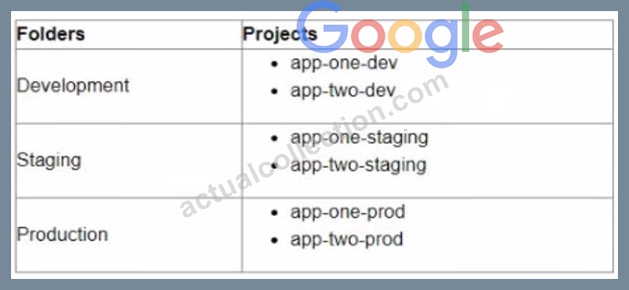
You want to configure Cloud Monitoring dashboards lo only display metrics from the projects within one folder You need to ensure that the dashboards do not display metrics from projects in the other folders You want to follow Google-recommended practices What should you do?
- A. Create a single new scoping project
- B. Create new scoping projects for each folder
- C. Use the current app-one-prod project as the scoping project
- D. Use the current app-one-dev, app-one-staging and app-one-prod projects as the scoping project for each folder
Answer: B
Explanation:
The best option for configuring Cloud Monitoring dashboards to only display metrics from the projects within one folder is to create new scoping projects for each folder. A scoping project is a project that defines which resources are monitored by Cloud Monitoring. You can create new scoping projects for each folder by using the gcloud monitoring register-project command. This way, you can associate each scoping project with a folder and only monitor the resources within that folder. You can then configure Cloud Monitoring dashboards to use the scoping projects as data sources and only display metrics from the projects within one folder.
NEW QUESTION # 64
As a Site Reliability Engineer, you support an application written in GO that runs on Google Kubernetes Engine (GKE) in production. After releasing a new version Of the application, you notice the application runs for about 15 minutes and then restarts. You decide to add Cloud Profiler to your application and now notice that the heap usage grows constantly until the application restarts. What should you do?
- A. Increase the CPU limit in the application deployment.
- B. Add high memory compute nodes to the cluster.
- C. Add Cloud Trace to the application, and redeploy.
- D. Increase the memory limit in the application deployment.
Answer: D
Explanation:
The correct answer is B, Increase the memory limit in the application deployment.
The application is experiencing a memory leak, which means that it is allocating memory that is not freed or reused. This causes the heap usage to grow constantly until it reaches the memory limit of the pod, which triggers a restart by Kubernetes. Increasing the memory limit in the application deployment can help mitigate the problem by allowing the application to run longer before reaching the limit. However, this is not a permanent solution, as the memory leak will still occur and eventually exhaust the available memory. The best solution is to identify and fix the source of the memory leak in the application code, using tools like Cloud Profiler and pprof12.
Reference:
Using Cloud Profiler with Go, Troubleshooting memory leaks. Profiling Go Programs, Heap profiles.
NEW QUESTION # 65
Your team is writing a postmortem after an incident on your external facing application Your team wants to improve the postmortem policy to include triggers that indicate whether an incident requires a postmortem Based on Site Reliability Engineenng (SRE) practices, what triggers should be defined in the postmortem policy?
Choose 2 answers
- A. The monitoring system detects that one of the instances for your application has failed
- B. The CD pipeline detects an issue and rolls back a problematic release.
- C. Data is lost due to an incident
- D. An external stakeholder asks for a postmortem
- E. An internal stakeholder requests a postmortem
Answer: D,E
Explanation:
The best options for defining triggers that indicate whether an incident requires a postmortem based on Site Reliability Engineering (SRE) practices are an external stakeholder asks for a postmortem and data is lost due to an incident. An external stakeholder is someone who is affected by or has an interest in the service, such as a customer or a partner. If an external stakeholder asks for a postmortem, it means that they are concerned about the impact or root cause of the incident, and they expect an explanation and remediation from the service provider. Therefore, this should trigger a postmortem to address their concerns and improve their satisfaction. Data loss is a serious consequence of an incident that can affect the integrity and reliability of the service. If data is lost due to an incident, it means that there was a failure in the backup or recovery mechanisms, or that there was a corruption or deletion of data. Therefore, this should trigger a postmortem to investigate the cause and impact of the data loss, and to prevent it from happening again.
NEW QUESTION # 66
You are implementing a CI'CD pipeline for your application in your company s multi-cloud environment Your application is deployed by using custom Compute Engine images and the equivalent in other cloud providers You need to implement a solution that will enable you to build and deploy the images to your current environment and is adaptable to future changes Which solution stack should you use'?
- A. Google Kubernetes Engine with Google Cloud Deploy
- B. Cloud Build with Packer
- C. Cloud Build with kpt
- D. Cloud Build with Google Cloud Deploy
Answer: D
Explanation:
Explanation
Cloud Build is a fully managed continuous integration and continuous delivery (CI/CD) service that helps you automate your builds, tests, and deployments. Google Cloud Deploy is a service that automates the deployment of your applications to Google Kubernetes Engine (GKE).
Together, Cloud Build and Google Cloud Deploy can be used to build and deploy your application's custom Compute Engine images to your current environment and to other cloud providers in the future.
Here are the steps involved in using Cloud Build and Google Cloud Deploy to implement a CI/CD pipeline for your application:
Create a Cloud Build trigger that fires whenever a change is made to your application's code.
In the Cloud Build trigger, configure Cloud Build to build your application's Docker image.
Create a Google Cloud Deploy configuration file that specifies how to deploy your application's Docker image to GKE.
In Google Cloud Deploy, create a deployment that uses your configuration file.
Once you have created the Cloud Build trigger and Google Cloud Deploy configuration file, any changes made to your application's code will trigger Cloud Build to build a new Docker image. Google Cloud Deploy will then deploy the new Docker image to GKE.
This solution stack is adaptable to future changes because it uses a cloud-agnostic approach. Cloud Build can be used to build Docker images for any cloud provider, and Google Cloud Deploy can be used to deploy Docker images to any Kubernetes cluster.
The other solution stacks are not as adaptable to future changes. For example, solution stack A (Cloud Build with Packer) is limited to building Docker images for Compute Engine. Solution stack C (Google Kubernetes Engine with Google Cloud Deploy) is limited to deploying Docker images to GKE. Solution stack D (Cloud Build with kpt) is a newer solution that is not yet as mature as Cloud Build and Google Cloud Deploy.
Overall, the best solution stack for implementing a CI/CD pipeline for your application in a multi-cloud environment is Cloud Build with Google Cloud Deploy. This solution stack is fully managed, cloud-agnostic, and adaptable to future changes.
NEW QUESTION # 67
Your application services run in Google Kubernetes Engine (GKE). You want to make sure that only images from your centrally-managed Google Container Registry (GCR) image registry in the altostrat-images project can be deployed to the cluster while minimizing development time. What should you do?
- A. Add logic to the deployment pipeline to check that all manifests contain only images from gcr.io/altostrat-images.
- B. Add a tag to each image in gcr.io/altostrat-images and check that this tag is present when the image is deployed.
- C. Use a Binary Authorization policy that includes the whitelist name pattern gcr.io/attostrat-images/.
- D. Create a custom builder for Cloud Build that will only push images to gcr.io/altostrat-images.
Answer: B
NEW QUESTION # 68
You support a high-traffic web application and want to ensure that the home page loads in a timely manner. As a first step, you decide to implement a Service Level Indicator (SLI) to represent home page request latency with an acceptable page load time set to 100 ms. What is the Google-recommended way of calculating this SLI?
- A. Count the number of home page requests that load in under 100 ms. and then divide by the total number of all web application requests.
- B. Buckelize Ihe request latencies into ranges, and then compute the percentile at 100 ms.
- C. Count the number of home page requests that load in under 100 ms, and then divide by the total number of home page requests.
- D. Bucketize the request latencies into ranges, and then compute the median and 90th percentiles.
Answer: C
NEW QUESTION # 69
You need to define Service Level Objectives (SLOs) for a high-traffic multi-region web application.
Customers expect the application to always be available and have fast response times. Customers are currently happy with the application performance and availability. Based on current measurement, you observe that the
90th percentile of latency is 120ms and the 95th percentile of latency is 275ms over a 28-day window. What latency SLO would you recommend to the team to publish?
- A. 90th percentile - 100ms
95th percentile - 250ms - B. 90th percentile - 250ms
95th percentile - 400ms - C. 90th percentile - 150ms
95th percentile - 300ms - D. 90th percentile - 120ms
95th percentile - 275ms
Answer: C
Explanation:
Explanation
https://sre.google/sre-book/service-level-objectives/
NEW QUESTION # 70
You are designing a new Google Cloud organization for a client. Your client is concerned with the risks associated with long-lived credentials created in Google Cloud. You need to design a solution to completely eliminate the risks associated with the use of JSON service account keys while minimizing operational overhead. What should you do?
- A. Use custom versions of predefined roles to exclude all iam.serviceAccountKeys. * service account role permissions.
- B. Apply the constraints/iam.disableserviceAccountKeycreation constraint to the organization.
- C. Apply the constraints/iam.disableServiceAccountKeyUp10ad constraint to the organization.
- D. Grant the roles/ iam.serviceAccountKeyAdmin IAM role to organization administrators only.
Answer: B
Explanation:
Explanation
The correct answer is B. Apply the constraints/iam.disableServiceAccountKeyCreation constraint to the organization.
According to the Google Cloud documentation, the constraints/iam.disableServiceAccountKeyCreation constraint is an organization policy constraint that prevents the creation of user-managed service account keys1. User-managed service account keys are long-lived credentials that can be downloaded as JSON or P12 files and used to authenticate as a service account2. These keys pose severe security risks if they are leaked, stolen, or misused by unauthorized entities34. By applying this constraint to the organization, you can completely eliminate the risks associated with the use of JSON service account keys and enforce a more secure alternative for authentication, such as Workload Identity or short-lived access tokens12. This also minimizes operational overhead by avoiding the need to manage, rotate, or revoke user-managed service account keys.
The other options are incorrect because they do not completely eliminate the risks associated with the use of JSON service account keys. Option A is incorrect because it only restricts the IAM permissions to create, list, get, delete, or sign service account keys, but it does not prevent existing keys from being used or leaked.
Option C is incorrect because it only disables the upload of user-managed service account keys, but it does not prevent the creation or download of such keys. Option D is incorrect because it only limits the IAM role that can create and manage service account keys, but it does not prevent the keys from being distributed or exposed to unauthorized entities.
NEW QUESTION # 71
Your application images are built and pushed to Google Container Registry (GCR). You want to build an automated pipeline that deploys the application when the image is updated while minimizing the development effort. What should you do?
- A. Use Cloud Pub/Sub to trigger a Spinnaker pipeline.
- B. Use Cloud Pub/Sub to trigger a custom deployment service running in Google Kubernetes Engine (GKE).
- C. Use Cloud Build to trigger a Spinnaker pipeline.
- D. Use a custom builder in Cloud Build to trigger a Jenkins pipeline.
Answer: A
Explanation:
https://cloud.google.com/architecture/continuous-delivery-toolchain-spinnaker-cloud
https://spinnaker.io/guides/user/pipeline/triggers/pubsub/
The most efficient way to build an automated pipeline that deploys the application when the image is updated is to use Cloud Pub/Sub to trigger a Spinnaker pipeline. This way, you can leverage the built-in integration between GCR and Cloud Pub/Sub, and use Spinnaker as a continuous delivery platform for deploying your application .
NEW QUESTION # 72
You support an application that stores product information in cached memory. For every cache miss, an entry is logged in Stackdriver Logging. You want to visualize how often a cache miss happens over time. What should you do?
- A. Configure BigOuery as a sink for Stackdriver Logging. Create a scheduled query to filter the cache miss logs and write them to a separate table
- B. Link Stackdriver Logging as a source in Google Data Studio. Filler (he logs on the cache misses.
- C. Create a logs-based metric in Stackdriver Logging and a dashboard for that metric in Stackdriver Monitoring.
- D. Configure Stackdriver Profiler to identify and visualize when the cache misses occur based on the logs.
Answer: C
Explanation:
Explanation
https://cloud.google.com/logging/docs/logs-based-metrics#counter-metric
NEW QUESTION # 73
You encounter a large number of outages in the production systems you support. You receive alerts for all the outages that wake you up at night. The alerts are due to unhealthy systems that are automatically restarted within a minute. You want to set up a process that would prevent staff burnout while following Site Reliability Engineering practices. What should you do?
- A. Create an incident report for each of the alerts.
- B. Eliminate unactionable alerts.
- C. Distribute the alerts to engineers in different time zones.
- D. Redefine the related Service Level Objective so that the error budget is not exhausted.
Answer: B
Explanation:
Eliminate bad monitoring : Unactionable alerts (i.e., spam) https://cloud.google.com/blog/products/management-tools/meeting-reliability-challenges-with-sre-principles agree with kyubiblaze about having to remove unactionable items aka spam: "good monitoring alerts on actionable problems" @ https://cloud.google.com/blog/products/management-tools/meeting-reliability-challenges-with-sre-principles
NEW QUESTION # 74
You have a CI/CD pipeline that uses Cloud Build to build new Docker images and push them to Docker Hub. You use Git for code versioning. After making a change in the Cloud Build YAML configuration, you notice that no new artifacts are being built by the pipeline. You need to resolve the issue following Site Reliability Engineering practices. What should you do?
- A. Run a Git compare between the previous and current Cloud Build Configuration files to find and fix the bug.
- B. Disable the CI pipeline and revert to manually building and pushing the artifacts.
- C. Change the CI pipeline to push the artifacts to Container Registry instead of Docker Hub.
- D. Upload the configuration YAML file to Cloud Storage and use Error Reporting to identify and fix the issue.
Answer: B
NEW QUESTION # 75
You need to reduce the cost of virtual machines (VM| for your organization. After reviewing different options, you decide to leverage preemptible VM instances. Which application is suitable for preemptible VMs?
- A. A GPU-accelerated video rendering platform that retrieves and stores videos in a storage bucket
- B. A scalable in-memory caching system
- C. A distributed, eventually consistent NoSQL database cluster with sufficient quorum
- D. The organization's public-facing website
Answer: A
Explanation:
https://cloud.google.com/compute/docs/instances/preemptible
NEW QUESTION # 76
Your company operates in a highly regulated domain that requires you to store all organization logs for seven years You want to minimize logging infrastructure complexity by using managed services You need to avoid any future loss of log capture or stored logs due to misconfiguration or human error What should you do?
- A. Use Cloud Logging to configure an aggregated sink at the organization level to export all logs into a BigQuery dataset
- B. Use Cloud Logging to configure an aggregated sink at the organization level to export all logs into Cloud Storage with a seven-year retention policy and Bucket Lock
- C. Use Cloud Logging to configure an export sink at each project level to export all logs into a BigQuery dataset
- D. Use Cloud Logging to configure an export sink at each project level to export all logs into Cloud Storage with a seven-year retention policy and Bucket Lock
Answer: B
Explanation:
Explanation
The best option for storing all organization logs for seven years and avoiding any future loss of log capture or stored logs due to misconfiguration or human error is to use Cloud Logging to configure an aggregated sink at the organization level to export all logs into Cloud Storage with a seven-year retention policy and Bucket Lock. Cloud Logging is a service that allows you to collect and manage logs from your Google Cloud resources and applications. An aggregated sink is a sink that collects logs from multiple sources, such as projects, folders, or organizations. You can use Cloud Logging to configure an aggregated sink at the organization level to export all logs into Cloud Storage, which is a service that allows you to store and access data in Google Cloud. A retention policy is a policy that specifies how long objects in a bucket are retained before they are deleted. Bucket Lock is a feature that allows you to lock a retention policy on a bucket and prevent it from being reduced or removed. You can use Cloud Storage with a seven-year retention policy and Bucket Lock to ensure that your logs are stored for seven years and protected from accidental or malicious deletion.
NEW QUESTION # 77
......
The Google Professional-Cloud-DevOps-Engineer exam is designed for professionals who have experience in cloud computing, DevOps, and software development. It covers a wide range of topics such as infrastructure automation, configuration management, continuous integration and delivery, and monitoring and logging. Professional-Cloud-DevOps-Engineer exam also includes hands-on experience with Google Cloud Platform tools and services, such as Kubernetes, Cloud Build, and Cloud Monitoring.
Real Updated Professional-Cloud-DevOps-Engineer Questions & Answers Pass Your Exam Easily: https://exams4sure.actualcollection.com/Professional-Cloud-DevOps-Engineer-exam-questions.html